
Let’s face it—running a restaurant is pure hustle. Between managing staff, juggling reservations, and responding to messages at all hours, it can feel like you’re always behind.
That’s why more and more restaurant owners are turning to Conversation AI—not as a gimmick, but as a real solution to real problems.
In this article, we’ll explore how restaurants are using AI chatbots to automate daily operations, improve customer experience, and even drive repeat business. From handling late-night inquiries to boosting Google reviews, these are the actual use cases restaurant owners are raving about.
Key Takeaways
- AI assistants can respond instantly to messages on SMS, Instagram, Google, Facebook, and your website
- Use AI to handle menu questions, booking requests, FAQs, and event inquiries—even at 2 AM
- Real restaurants are saving 20+ hours per week in staff time using Conversation AI
- It can integrate with your CRM, booking system, and retargeting campaigns
- You don’t need tech skills to launch it—just plug it into your GHL dashboard
What is Conversation AI in Restaurants
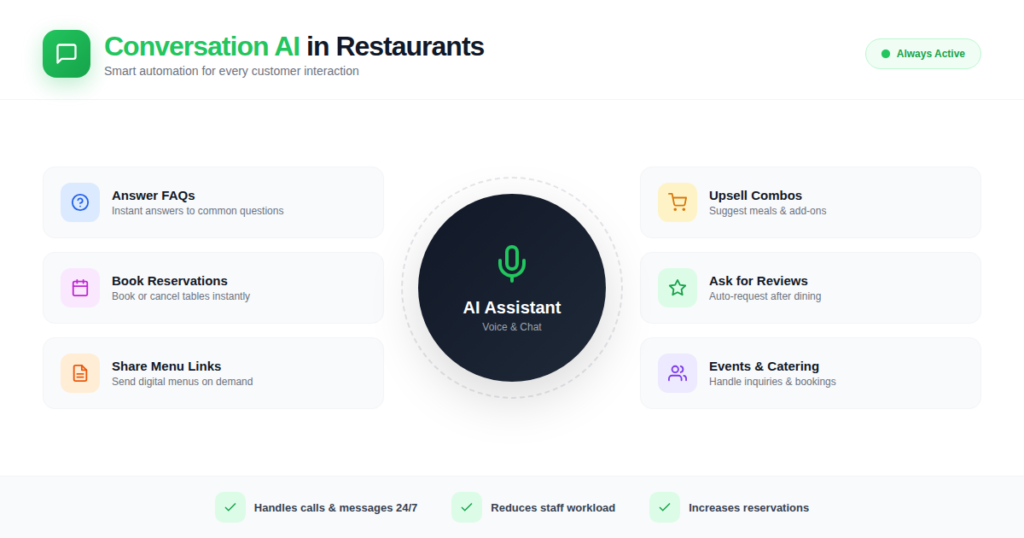
Conversation AI refers to an AI-powered chatbot or voice assistant that handles customer inquiries automatically—without human input. Built into platforms like GoHighLevel, this smart assistant can:
- Answer FAQs
- Book or cancel reservations
- Share menu links
- Upsell combo meals
- Ask for reviews
- Help with event or catering inquiries
Think of it as a virtual front-desk host who never calls in sick, never sleeps, and always answers with a smile.
Why Restaurants Are Using Conversation AI
Here’s the truth: most customers expect fast, helpful responses—and if they don’t get them, they move on.
Restaurants lose money daily from:
- Missed calls
- Unanswered DMs
Late replies to reservation questions
Conversation AI solves this by replying instantly and accurately every time.
Top Benefits for Restaurant Owners
- 💬 24/7 automated messaging
- 📅 Auto-booking and reservation handling
- 🌟 Increase in positive reviews
- 🔁 Smart retargeting and upsells
- ⏱️ 20+ hours saved per week in manual replies
Real Use Case 1 Answering Menu & Hours Questions 24/7
Scenario: A customer DMs your Instagram at 10:48 PM:
“Hey, are you open tomorrow? Do you have vegan options?”
Without AI: The message sits there until someone checks it in the morning.
With AI: The assistant replies instantly:
“Hi! Yes, we’re open from 11 AM to 10 PM. And yes, we offer several vegan dishes! You can check our full menu here: [menu link].”
Result: The customer gets their answer, books a table, and doesn’t head to your competitor.
🛠️ Pro Tip: You can preload FAQs about hours, dietary options, parking, and delivery into the GHL Conversation AI bot.
Real Use Case 1 Answering Menu & Hours Questions 24/7
Scenario: Someone texts your number:
“Hi, can I book a table for 4 on Friday at 7?”
With AI in Auto-Pilot Mode:
The bot confirms availability, books the table, and sends a calendar reminder. No human needed.
Result:
You capture more bookings while your team focuses on service—not answering the phone every 10 minutes.
Real Use Case 1 Answering Menu & Hours Questions 24/7
Scenario: After a dine-in visit, your customer gets a thank-you text from your AI assistant:
“Hi [Name], thank you for dining with us today! Would you mind leaving a quick review? Here’s the link: [Google Review Link].”
With AI:
The message goes out automatically based on the customer’s visit time or order completion.
Result:
Restaurants using this system see 2–3 times more 5-star reviews in the first month.
📈 Why It Matters: Reviews directly impact search rankings and foot traffic.
Real Use Case 1 Answering Menu & Hours Questions 24/7
Scenario: Someone messages:
“Do you host birthday parties? How many people can fit in your event space?”
AI Response:
“Yes, we host private events for up to 50 guests. We offer custom menus for birthdays, corporate gatherings, and more. Want me to connect you with our event coordinator?”
With AI:
The conversation is handled smoothly, and serious leads are escalated to staff.
💡 Bonus: Add branching logic in GHL workflows to route different questions to the right contact or calendar.
Real Use Case 1 Answering Menu & Hours Questions 24/7
Scenario: A customer asks:
“What’s in the family combo?”
AI Response:
“The family combo includes 2 pizzas, 1 appetizer, and 4 drinks for $39. Want to order now or book a table?”
Result:
AI doesn’t just respond—it sells.
🎯 Tip: Use GoHighLevel’s Workflow AI to include personalized offers based on the customer’s last visit or order history.
How to Set Up Conversation AI in GoHighLevel
Here’s a step-by-step to get your AI assistant running in GHL:
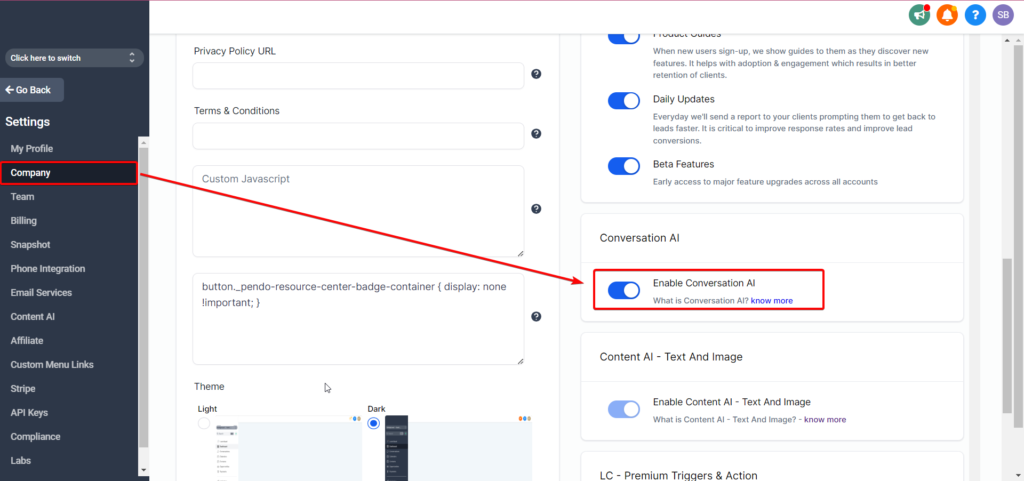
Step 1: Turn on Conversation AI
- Go to Settings → Conversation AI
- Switch from OFF to Auto-Pilot Mode for full automation or Suggestive Mode for human approval
Step 2: Choose Your Channels
Supports:
- SMS
- Web chat
- Facebook Messenger
- Instagram DMs
- Google Business Profile (GBP)
Enable the ones you use most.
Step 3: Train the Bot
Under the Bot Training section:
- Add Q&A pairs (e.g., “Do you have gluten-free?” → “Yes, check our gluten-free options here”)
- Or import URLs (like your menu page or FAQ page)
Step 4: Assign Intents
Choose between:
- General Support (for FAQs, menu, etc.)
- Appointment Booking (for reservations or event bookings)
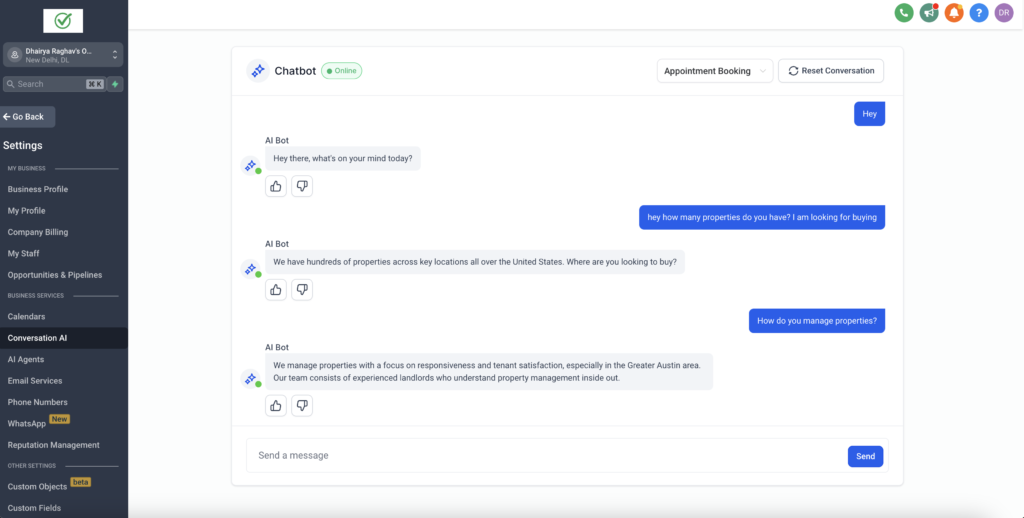
Step 5: Test Before You Launch
Use the Bot Trial feature to preview answers and fine-tune.
👍 Thumbs up or down responses to improve over time.
Frequently Asked Questions
Can I use Conversation AI without the $97/mo AI Employee plan?
Will the bot work with Instagram and WhatsApp?
Can I customize the bot’s responses?
Does the AI take over everything?
How do I know what it’s saying?
Conclusion
Conversation AI isn’t just for tech giants anymore. Restaurants of all sizes are using it to respond faster, book more tables, collect more reviews, and sell more specials—without adding more staff.
It’s affordable, easy to set up, and works 24/7. Whether you’re a restaurant owner or agency supporting food businesses, this tool is a must-have in your digital playbook.
So if you’re still replying to every DM manually… it’s time to let AI do the talking.
👉 Try Conversation AI in your restaurant today and free up your time for what matters most—your guests.