
A line cook in Ballard films a 20-second reel of black cod hitting the broiler, captions it “comment MENU for tonight’s tasting list,” and posts it before the Friday rush. By the time the dining room is slammed, 60 Seattle diners have commented MENU — and every one of them already has a DM with the menu, a “want a table tonight?” line, and a booking link, sent within seconds. Nobody on the floor lifted a finger. That’s Instagram comment automation, and it’s the closest thing a Seattle restaurant has to a host who never sleeps, never gets in the weeds, and never leaves a hungry local on read.
This is the operator’s how-to: what comment-to-DM automation actually is, why speed is the whole game, and the exact six steps to set it up for your restaurant — compliantly, inside Meta’s real rules, not some gray-area hack.
Table of Contents
- The 30-second answer
- What Instagram comment automation actually is
- Why it works so well for Seattle restaurants
- Why speed-to-reply is the whole game
- How to set it up: the 6-step playbook
- Stay compliant: Meta’s rules and TCPA
- DIY vs done-for-you
- Frequently asked questions
The 30-Second Answer
Instagram comment automation lets a Seattle restaurant turn a comment on a post or reel into an instant, personalized DM — “comment MENU and we’ll send it” — that answers the guest and books the table, automatically. Meta supports it two ways: no-code keyword automations inside Meta Business Suite, or the Instagram Private Replies API used by agencies and tools. It works because short-form video puts your “comment a word” prompt in front of thousands of local diners who don’t follow you yet, and because an automated reply lands in seconds — while the deciding window for an interested guest is measured in minutes, not the hours it takes a slammed host to get to the inbox. Set it up in six steps, stay inside Meta’s one-reply-per-comment and messaging-window rules, and route every booking to your CRM.
What Instagram Comment Automation Actually Is
Strip away the jargon and it’s a simple if-this-then-that for your comment section:
If a diner comments a keyword you chose (say MENU, BOOK, or HAPPYHOUR) on your post or reel, then Instagram automatically sends that person a direct message you wrote in advance — with a link, a photo, a set of buttons, or a question that starts a booking.
Meta offers this officially through two doors:
- The no-code door — Meta Business Suite Automations. In your Professional account’s Business Suite inbox, you create a keyword automation: pick trigger words, write the auto-response, and Meta sends it when someone comments (or messages) a match. Note two things from Meta’s own docs: custom keyword automations currently live in the Business Suite desktop experience, and keyword matching is exact — so “MENU” and “menus” are different triggers. (Meta Business Help: About Automated Responses)
- The API door — Instagram Private Replies. This is the engine behind every “comment a word and I’ll DM you” post at scale. When a user comments on your post, reel, or live, a Professional account — or an approved tool built on the Instagram Messaging API — may send that commenter exactly one private-reply DM. (Meta for Developers: Private Replies)
Why It Works So Well for Seattle Restaurants
Seattle is a food city with a crowded field — Washington State has roughly 16,700 eating-and-drinking establishments employing more than 227,500 people (National Restaurant Association, 2024–25). From Capitol Hill to Fremont to West Seattle, a hungry local scrolls a dozen feeds before picking a table. The deciding factor is rarely the menu — it’s who showed up on the phone, and who answered fast.
The discovery has moved to the feed. Look at how diners actually choose, by the generations filling Seattle’s rooms:
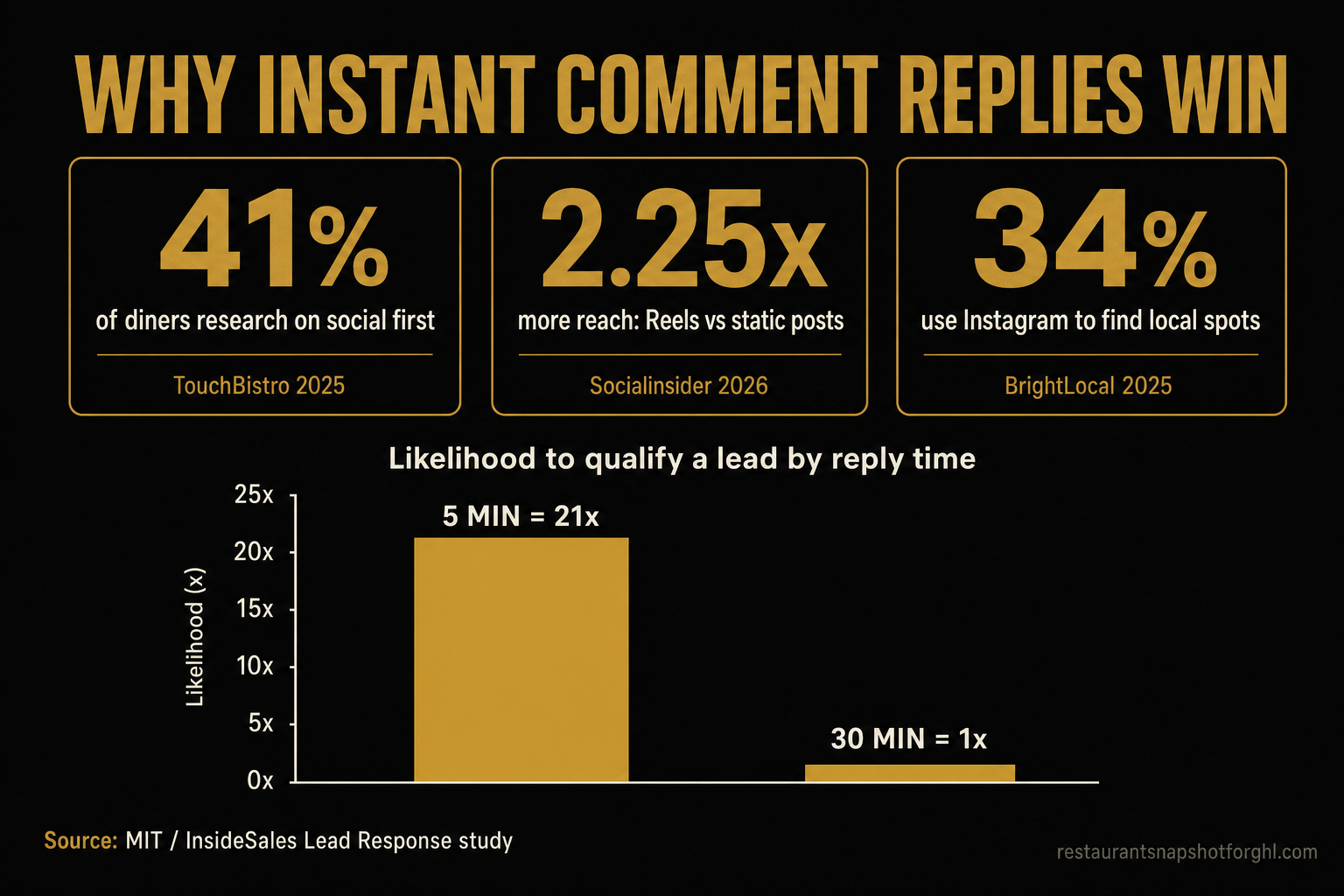
Share of diners who use social media to research a restaurant before visiting. Source: TouchBistro, 2025 American Diner Trends Report.
Among Gen Z diners, 55% use Instagram to check out restaurants and 52% have tried a new spot based on positive social feedback (TouchBistro, 2025). And this isn’t a niche channel: 34% of consumers use Instagram to find and evaluate local businesses (BrightLocal, 2025), out of roughly 172 million U.S. Instagram users at the start of 2025 (Statista, 2025).
Reels are what put your “comment a word” prompt in front of strangers. Short-form vertical video is the format the algorithm pushes hardest to people who don’t follow you — exactly the new Seattle diner you want. Instagram Reels reach about 2.25× more accounts than static image posts (Socialinsider, 2026). So a single reel of your smoked salmon chowder, captioned “comment BOWL for the recipe + a table,” can reach thousands of locals — and comment automation catches every one who bites.
Why Speed-to-Reply Is the Whole Game
Here’s the part owners underestimate: comment automation isn’t really about saving labor — it’s about speed. The moment a diner comments MENU, you have a tiny window where they’re leaning in, phone in hand, hungry. Wait, and the moment passes; they scroll on and book the place that answered.
The classic research on this is brutal. In the MIT / InsideSales Lead Response Management study, businesses that responded to an inbound lead within 5 minutes were about 21× more likely to qualify that lead than businesses that waited just 30 minutes — and roughly 100× more likely to even make contact (via Revenue.io). Separately, Harvard Business Review found the average company takes about 42 hours to respond to an inbound web lead — long after the window has closed (HBR, 2011).
Relative likelihood of qualifying an inbound lead by response time (30-minute reply = 1×). Source: MIT / InsideSales Lead Response Management study, via Revenue.io.
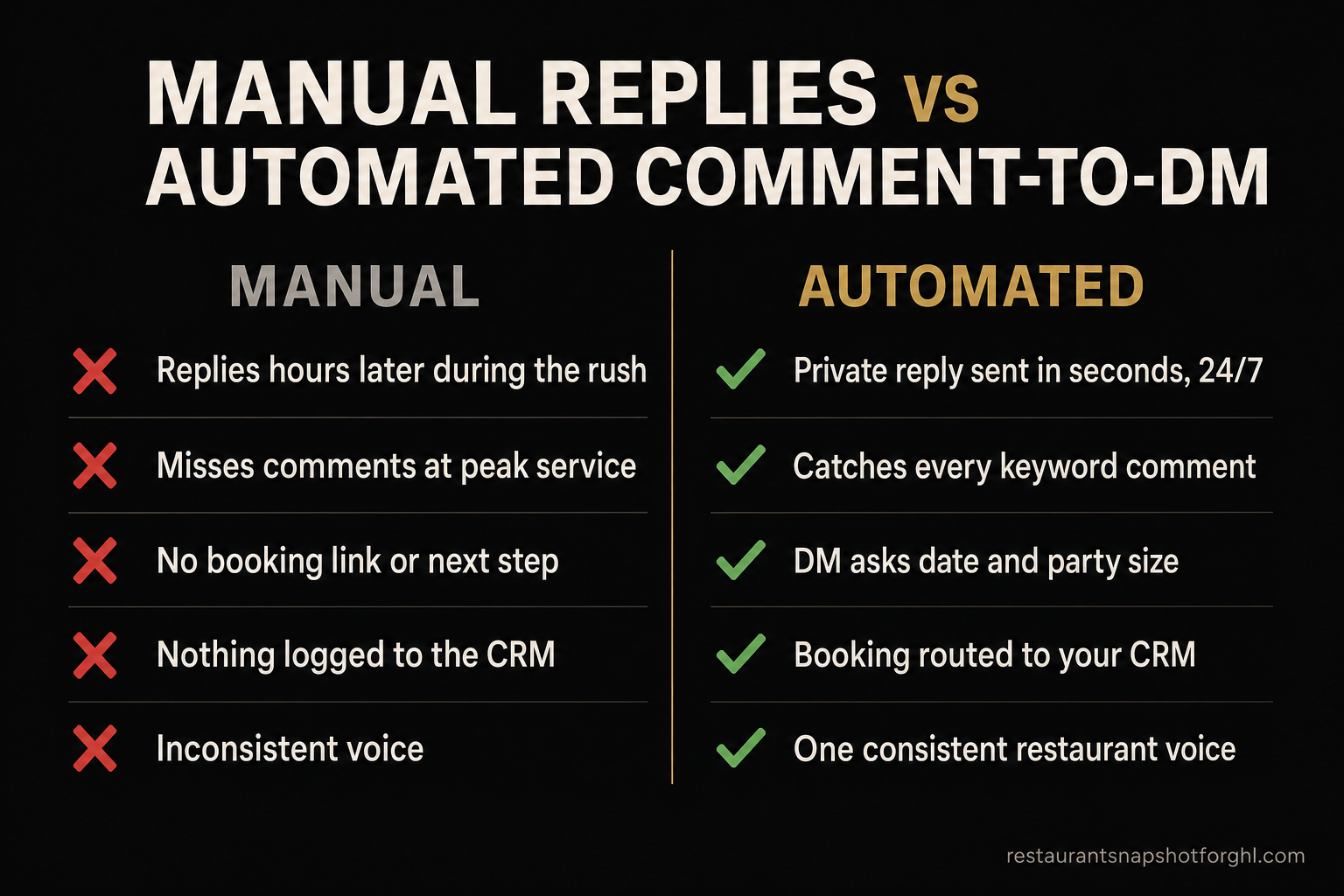
Now map that onto a Friday service. A guest comments BOOK at 6:47 p.m. Your host is triple-seated, on hold with a supplier, and running food. They see the comment at 9:30, if at all. That’s not a 5-minute reply — it’s a 3-hour one, and the diner ate somewhere else at 8. An automated private reply collapses that gap to seconds, every time, even at peak. It’s the same lesson operators already learned with missed-call text-back: the business that answers instantly wins the cover.
How to Set It Up: the 6-Step Playbook
Here’s the whole build. You can do steps 1–4 yourself in an afternoon with Meta Business Suite; steps 5–6 are where a purpose-built tool (or a done-for-you team) earns its keep.
Step 1 — Switch to a Professional account and connect your Page
Comment and DM automations require an Instagram Business (Professional) account linked to a Facebook Page inside Meta Business Suite. If you’re still on a personal profile, convert it in Settings → Account type. This also unlocks insights so you can measure what’s working.
Step 2 — Pick ONE obvious keyword per post
One post, one trigger. Make it a word a diner would naturally type and that you can say out loud in the reel: MENU, BOOK, SPECIALS, HAPPYHOUR, BRUNCH. Because Meta’s keyword matching is exact, keep it short and singular, and tell people precisely what to type: “comment the word MENU — one word — and we’ll DM you tonight’s list.” Avoid triggers that collide with normal comments (don’t use YES or HI).
Step 3 — Build the keyword automation
In Meta Business Suite → Inbox → Automations (desktop), create a keyword automation: set the trigger word(s), choose whether it fires on comments, DMs, or both, and write the auto-response. Or, if you’re using a tool built on the Instagram Messaging API, configure the same trigger there — it uses the official Private Replies mechanism under the hood. (Meta Business Help: Set up Inbox Automations)
Step 4 — Write the DM that actually books the table
This is where most restaurants blow it — they send a bare link. Structure the DM to move the guest:
- Deliver the promise first. “Here’s tonight’s tasting menu 👇 [link].” Give them exactly what they asked for, immediately.
- Then ask a booking question. “Want me to hold you a table? Just reply with a day, time, and party size.”
- Make it one tap where you can. Buttons or a booking link beat free-typing. Point them at your reservation flow or a booking link.
Keep it warm and human — your restaurant’s voice, not a robot’s. A great DM agent can carry the whole back-and-forth: answer “is the patio dog-friendly?”, collect party size, and confirm the table.
Step 5 — Add a fallback comment reply (and keep it human where it counts)
Publicly reply to the comment too (“Sent you a DM! 🍽️”) — that public reply boosts engagement, which the algorithm rewards with more reach, and it reassures other scrollers the offer is real. A comment agent can post these public replies across Instagram, Facebook, and TikTok at scale while the DM does the private work.
Step 6 — Route every booking to your CRM and measure
A booking that lives only in your Instagram inbox is a booking you’ll lose. Route each confirmed table into your calendar and CRM with the guest’s name, party size, and the full conversation, so your host can confirm, upsell a private event, or add them to a win-back list later. Then watch four numbers per post: comments on the keyword, DMs opened, replies, and tables booked. That last one is the only one that pays rent.
Stay Compliant: Meta’s Rules and TCPA
Comment automation is fully sanctioned by Meta — as long as you stay inside the guardrails. Break them and you risk messaging restrictions on your account. The rules are simple:
- One private reply per comment. You may send a commenter exactly one private-reply DM off a single comment — you can’t chain-DM someone from one comment. (Meta for Developers: Private Replies)
- The 7-day comment window. That first private reply must go out within 7 days of the comment. In practice you want it in seconds, so this is rarely a constraint — but it’s the sanctioned way to DM someone who hasn’t messaged you first.
- The 24-hour messaging window. Once the guest replies to your DM, a standard 24-hour window opens for free-form back-and-forth. Outside that window you’re limited to approved message tags — no promotional blasts.
- No spam, real consent. Automated messages can’t be unsolicited bulk spam, and content must follow Meta’s messaging policy.
DIY vs Done-For-You
You can absolutely start with Meta Business Suite’s free keyword automations — it’s the right first move for a single location testing the idea. The ceiling comes when you want it to scale: multi-step DM conversations that actually book, the same flow running across Instagram, Facebook and TikTok, public comment replies at volume, and every booking landing in your CRM instead of a phone inbox. Here’s the honest trade-off:
Three ways to run comment automation for your Seattle restaurant
| Plan | Done-For-You recommended | Meta Business Suite (DIY) | Point Automation Tool |
|---|---|---|---|
| Price | From $397/mo | Free | ~$15–$100+/mo |
| Feature 1 | AI comment + DM + web-chat agents | Native keyword auto-replies (desktop) | Comment-to-DM flows via the API |
| Feature 2 | Multi-step DMs that collect date & party size | One preset DM per keyword | Better flow builder than native |
| Feature 3 | Instagram, Facebook & TikTok, in your voice | Exact-match keywords only | Still you writing every flow & post |
| Feature 4 | Books reservations straight into your CRM | No real booking conversation | CRM/booking wiring is on you |
| Feature 5 | Compliant within Meta + TCPA guardrails | Nothing routed to a CRM | Another tool to learn and maintain |
| Feature 6 | 9-channel content engine included, white-label | You watch the inbox and build content | No content or reels produced for you |
For most independent Seattle restaurants, the math favors done-for-you: you get the comment agent, the booking DM, the reels that drive the reach, and the CRM wiring for less than 7% of one social-manager salary — instead of a new tool to babysit on top of a dinner rush. It’s the same guest-data flywheel behind everything from local map-pack ranking to Dallas-style done-for-you social.
The Bottom Line
Your Seattle restaurant already does the hard part — the food is good and the room is ready. What leaks is attention: the high-intent local who watches your reel, comments MENU, and never hears back because the floor was slammed. Comment automation closes that gap. It’s officially supported by Meta, it fires in seconds when a 5-minute reply is 21× better than a 30-minute one, and it turns your reels — the content that already reaches the most new diners — into a booking machine that runs through the rush. Build it yourself in an afternoon, or hand the whole comment-to-table flow to a team that runs it across every channel and books straight to your CRM. Either way, stop leaving hungry Seattle diners on read.
Frequently Asked Questions
Instagram comment automation for restaurants — common questions
Is Instagram comment-to-DM automation allowed by Meta?
Yes. Meta officially supports it two ways: no-code keyword automations in Meta Business Suite, and the Instagram Platform 'Private Replies' feature used by approved tools and agencies. The rules are that you may send one private-reply DM per comment, within 7 days of that comment, and free-form messaging is limited to a 24-hour window after the guest replies. Stay inside those guardrails and it's a sanctioned flow, not a loophole.
How do I set up 'comment a word to get a DM' for my restaurant?
Convert your Instagram to a Professional account and link a Facebook Page, then in Meta Business Suite (desktop) → Inbox → Automations, create a keyword automation: set your trigger word (like MENU), and write the DM it sends. Say the exact keyword out loud in your reel and caption. For multi-step booking conversations across Instagram, Facebook, and TikTok, use a tool built on the Instagram Messaging API or a done-for-you service.
Why does response speed matter so much?
Because interest is perishable. Research from MIT/InsideSales found businesses that reply to an inbound lead within 5 minutes are about 21× more likely to qualify it than those that wait 30 minutes, and roughly 100× more likely to make contact. A slammed host replies hours later — HBR found the average business takes about 42 hours. An automated private reply fires in seconds, every time, even at peak service.
Do Seattle diners actually use Instagram to pick restaurants?
Yes. 41% of U.S. diners research a restaurant on social media before visiting — 57% of Millennials and 67% of Gen Z (TouchBistro, 2025) — and 34% of consumers use Instagram to find local businesses (BrightLocal, 2025). Reels reach about 2.25× more accounts than static posts (Socialinsider, 2026), so a 'comment a word' reel lands in front of local diners who don't follow you yet.
What should the automated DM actually say?
Deliver the promise first (the menu, the specials, the link they asked for), then ask a booking question: 'Want me to hold you a table? Reply with a day, time, and party size.' Make it one tap where you can with buttons or a booking link, keep it in your restaurant's voice, and route the confirmed booking into your calendar and CRM.
Can I follow up by text after they DM me?
Only with consent. The moment you move a guest from Instagram to SMS, you're under U.S. telecom law — TCPA and A2P 10DLC. You need express written consent before texting, you must identify your restaurant, and you must honor STOP. Don't scrape phone numbers from DMs and start blasting. See our TCPA & A2P 10DLC guide for restaurants.
Gina is a hospitality marketing writer who came up through catering and event sales before falling in love with diner data. She translates dense automation concepts into plain English for owner-operators who’d rather be in the kitchen than in a CRM. When she’s not writing about win-back campaigns and weekly-specials blasts, she’s testing local restaurants’ comment automations and reels to see who’s answering fast enough to win the table.
Related reading
- Turn Instagram DMs into booked tables
- Missed-call text-back: capture every unanswered call
- Restaurant social media management in Dallas: why Reels fill tables
- TCPA & A2P 10DLC: what restaurants need to know before sending one SMS
- Restaurant local SEO & the Google map pack
Sources
- TouchBistro — 2025 American Diner Trends Report (41% research on social; 67% Gen Z / 57% Millennials; 55% Gen Z Instagram; 52% tried a spot from social)
- BrightLocal — Local Consumer Review Survey 2025 (34% use Instagram for local discovery)
- Socialinsider — 2026 Instagram Benchmarks (Reels ≈ 2.25× reach vs static)
- MIT / InsideSales — Lead Response Management study (5-min reply ≈ 21× to qualify, ≈ 100× to contact), via Revenue.io
- Harvard Business Review — The Short Life of Online Sales Leads (average ≈ 42-hour response)
- Statista — Countries with the most Instagram users, 2025 (~172M in the U.S.)
- National Restaurant Association — Washington State fact sheet (~16,700 establishments; ~227,500 employees)
- Meta Business Help — About Automated Responses in Meta Business Suite Inbox
- Meta Business Help — Set up Inbox Automations
- Meta for Developers — Instagram Platform: Private Replies
- Meta for Developers — Messenger Platform / IG Messaging policy