Appetizer
- All 27 themes and 11 UI kits
- Dark mode across GoHighLevel
- Your logo and brand colours everywhere
- Sidebar or top-bar menu layout
- All 16 animated login page designs

GHL Look & Feel · a self-serve account
This GHL customizer is a lifetime account you run yourself: 27 themes, 16 animated login pages, 18 dashboard designs, menus, pipeline boards and website widgets, previewed live and switched on with one line of code. Built for agencies serving restaurants and for operators who want GoHighLevel to feel like their own dining room. Paid once, from $157.
The tasting
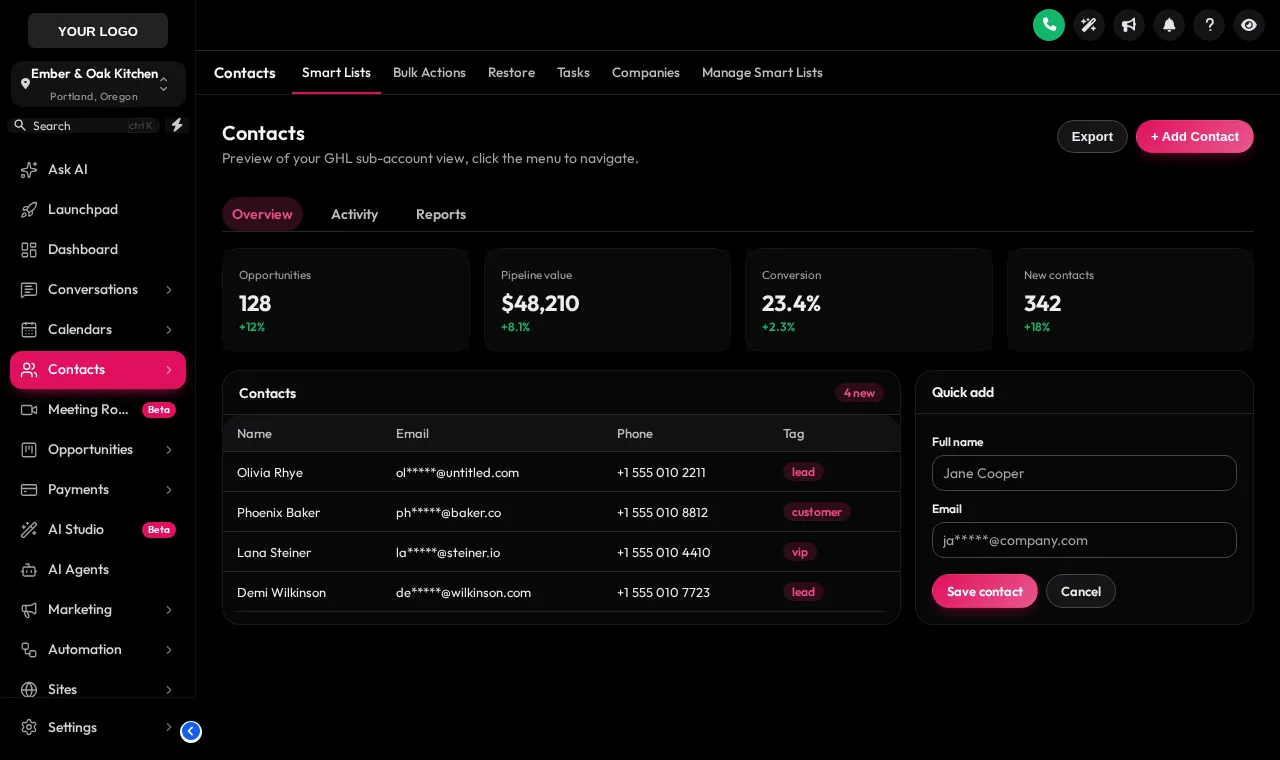
Below is the real customizer engine restyling a copy of the GoHighLevel interface for a sample restaurant, Ember & Oak Kitchen. Pick a theme and a UI kit, then move between the guest list, a dashboard design, the pipeline board and a mega menu. No login, nothing saved.
Warming up the live preview
Obsidian OLEDThe real customizer engine restyling a copy of the GoHighLevel interface for a sample restaurant. The menu, the collapse arrow and the quick-add form inside it all respond.
In one paragraph
A GHL customizer changes how GoHighLevel looks and adds helpful controls on top of it, without touching contacts, workflows or billing. You choose a theme, login page, menu layout and dashboard in a visual editor, then one line of custom JavaScript applies it to every login across your agency or to the sub-accounts you pick.
The account lives on the GHL Customer Care customizer platform. You own your designs, keep version history, and can change anything at any time; edits reach GoHighLevel the moment you save.
Who orders it
Every client login, dashboard and pipeline carries your brand, so the platform you resell looks like your product.
One consistent look across every location, so a manager moving between venues finds everything in the same place.
A calmer, easier-to-read GoHighLevel for the host stand and the manager’s office.
Popups, rating badges and call buttons for restaurant websites, all feeding leads into GoHighLevel.
The ten courses
Each course has its own page with a live preview, real counts from the catalogue, restaurant use cases and its own questions answered. The tag shows the first menu that includes it.
The first thing a client sees: an animated sign-in in your colours, carried through two-factor and password reset.
Table setting · from AppetizerColours, logo, UI kit and dark mode across every screen, so GoHighLevel looks like your house, not a rental.
The pass · from Main CourseA welcome banner with a live clock and quick links on every sub-account dashboard, plus styled widgets.
Floor plan · from AppetizerSidebar, top bar or icons-only, with mega menus that open whole sections and a floating quick menu.
Ticket rail · from Main CourseStage colours and styled deal cards on the opportunities board, so private-dining enquiries read at a glance.
Server pad · from Main CourseOne-tap quick tags and short forms on each guest record: VIP, allergy note, occasion, review ask.
Specials board · from Chef's TableAnnouncements inside GoHighLevel and offers on restaurant websites, with exit, scroll and delay triggers.
Word of mouth · from Chef's TableBooking counters, Google rating badges, surveys and prize wheels in the corner of a restaurant site.
Call button · from Chef's TableA call, text and directions button that stays in reach on every page of a restaurant website.
Kitchen maths · from Chef's TableEmail and SMS ROI, no-show cost and review-value calculators to put numbers in front of an owner.
Why it matters on a busy floor
From order to service
Four steps, and only the last one happens inside GoHighLevel. Most people go from checkout to a restyled login in under an hour. The full install guide covers where the code goes and what to do if your restaurant is on someone else’s agency.
Pick Appetizer, Main Course or Chef's Table and pay once by card through Stripe. No subscription is created.
The account is created automatically and your email plus a temporary password arrive within minutes, never later than 24 hours.
Log in, change the password, then pick your theme, login page, menus and widgets with a live preview beside every setting.
Agency Settings, Company, White Label, Custom JS: paste the line once (plus one CSS line for the login page). Later edits go live with no re-install.
Straight answers
A one-time payment, lifetime access account on the GHL Customer Care customizer, with a live editor, previews and version history.
A done-for-you design service. You make the choices; support helps if you are stuck. It is also not a POS, reservation or delivery platform.
Access to your GoHighLevel agency settings to paste one line of code, or an agency partner willing to paste it for you.
Questions at the pass
A GHL customizer is a tool that restyles the GoHighLevel interface without touching your data: theme colours, logo, login page, menus, dashboards and widgets. This one is a lifetime account on the GHL Customer Care platform. You design in a live editor and switch it on with one line of code in your agency settings.
Both. Agencies that resell GoHighLevel to restaurants use it so every client login, dashboard and pipeline carries the agency brand. Multi-unit groups and single restaurants with their own GoHighLevel agency account use it to make the screens their hosts and managers work in all shift calmer and easier to read.
It is a one-time payment with lifetime access: Appetizer $157, Main Course $387, Chef's Table $787. There is no monthly fee. The packages differ in which modules are switched on and how many workspaces, team members and saved templates the account holds.
No. This is a self-serve account. You log in, pick and adjust designs in the live editor, and paste one line into GoHighLevel yourself. It takes about two minutes. The help docs and the support team are there if you get stuck, but nobody builds it for you.
Your login (email plus a temporary password) is emailed as soon as payment completes, usually within minutes. If the automatic setup fails, the team creates the account by hand, always inside 24 hours.
No. The customizer only changes how GoHighLevel looks and adds optional buttons and widgets. Contacts, conversations, calendars, workflows and any restaurant snapshot you run, including ours, keep working exactly as before. Remove the line of code and GoHighLevel returns to stock.
Yes. The install line goes into Agency Settings, Company, White Label, Custom JS. If your restaurant uses GoHighLevel through someone else’s agency, that agency has to paste the line for you; it takes them about two minutes and we never need anyone’s GoHighLevel password.
Yes. Each workspace is one brand with its own designs, login CSS and install code. Appetizer holds 1 workspace, Main Course holds 2 workspaces, Chef's Table holds 3 workspaces. Widgets and the contact actions bar can also be shown in every sub-account or only in the ones you list.
The customizer is maintained on the GHL Customer Care platform, so fixes reach you through the same line of code. You do not re-install anything, and your saved designs stay in your account with version history.
Yes. Every preview on these pages runs the real customizer engine on a copy of the GoHighLevel interface. Switch themes, login designs, dashboards, popups and widgets above and on each course page; nothing is saved and no login is needed.
Ready when you are
Most restaurant agencies start with the Main Course: themes, login pages, dashboards, pipeline styles and the contact actions bar, paid once.
Paid once by card through Stripe · login by email within minutes · no monthly fee
Manage how we use cookies. Necessary cookies keep the site working and can't be turned off.
Saved on this device. Press Esc to close.