
Course X · Kitchen maths
A GHL marketing ROI calculator that does the kitchen maths out loud
A GHL marketing ROI calculator lets a restaurant owner see what their own guest list could earn, with sliders they move themselves. The customizer has 134 calculator templates across 14 types, from email and SMS marketing ROI to no-show cost and review value, styled to your site and wired to collect leads.
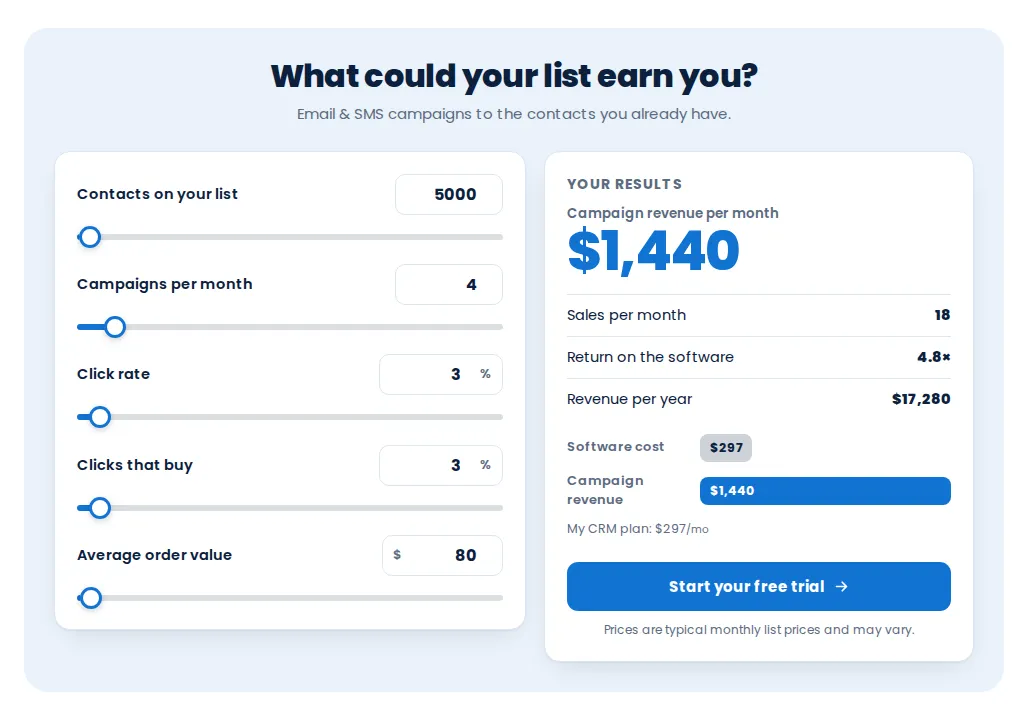
The template’s sample numbers
- Contacts on the list
- 5,000
- Campaigns a month
- 4
- Click rate
- 3%
- Clicks that buy
- 3%
- Average order
- $80
- Campaign revenue a month
- $1,440
5,000 × 4 × 3% × 3% × $80. Visitors change every input.
Do the maths
Try the SMS marketing ROI calculator
Ten templates of the email and SMS marketing ROI calculator, live. Drag the sliders or type numbers; the return recalculates as you go.
Warming up the live preview
SplitDrag the sliders or type your own numbers; the return recalculates as you go.
The whole spice rack
All 14 GoHighLevel calculator widget types
Open the no-show reducer for a restaurant owner, the reseller-profit calculator for your own agency pitch, or any other type, and lay a style preset over it.
Warming up the live preview
SplitPick a type, a template and a style. The style chips lay any preset over the template.
Four groups
134 templates by type
Savings
- Stack replacement table13
- Savings calculator9
- Us vs them7
Return on investment
- ROI calculator10
- Speed to lead10
- No-show reducer10
- Time saved by automation10
- Database reactivation10
- Email & SMS marketing ROI10
Add-on value
- Missed call text-back10
- Reviews & reputation10
- AI agent vs staff10
Pricing and resale
- Reseller profit10
- Price builder5
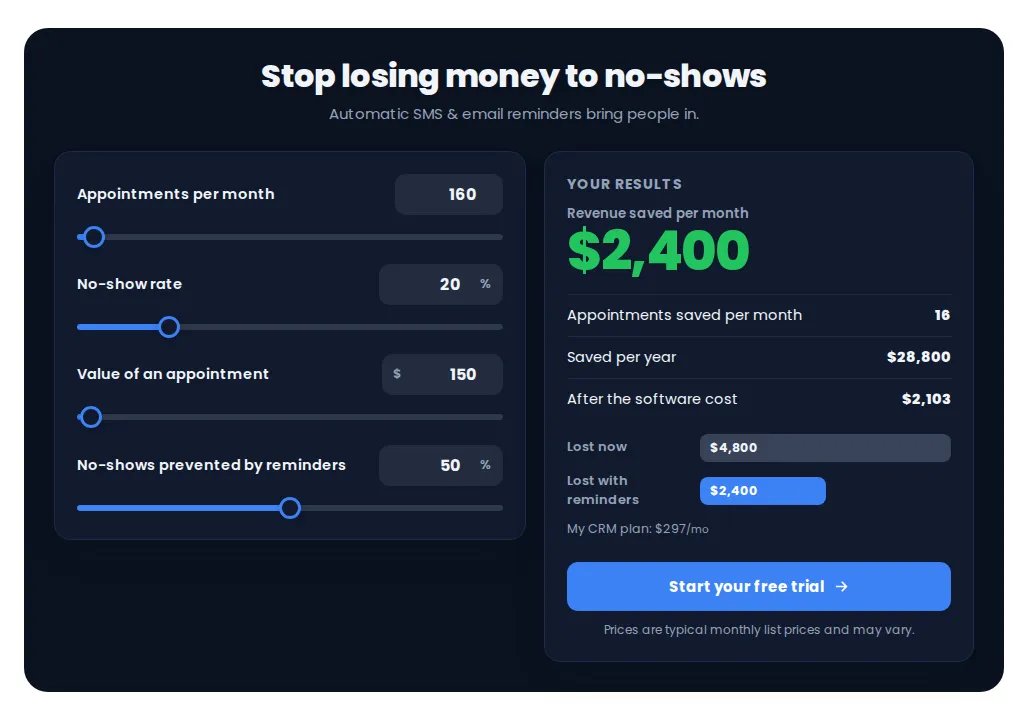
Restaurant no-show cost calculator and more
Where the numbers do the selling
- Agency proposals
Put the marketing ROI calculator on your restaurant landing page and let the owner fill in their own list size.
- No-show conversations
The no-show reducer turns “a few empty tables” into a monthly figure an owner remembers.
- Review programmes
The reviews and reputation calculator links more reviews to more covers, using the owner’s inputs.
- Your own pricing
A price builder that adds up the services an agency sells to restaurants.
A calculator is an estimate built from the visitor’s own inputs. Use realistic defaults and a short note that results are not guaranteed.
Setting it up
How to publish a calculator
Pick a calculator type
Choose one of 14 types, such as email and SMS marketing ROI or the no-show reducer, and one of its templates.
Set the sliders and defaults
Decide which inputs a visitor can move, their ranges and starting values, and the wording of each label.
Style it
Keep the template style or lay one of 13 style presets over it, then add your call to action.
Embed and collect
Place it on a website or funnel. Chef's Table keeps up to 10 calculators live, and the call to action can collect leads into GoHighLevel.
Questions over the numbers
GHL marketing ROI calculator FAQs
How do I show marketing ROI to a restaurant owner?
Let them move the numbers themselves. The email and SMS marketing ROI calculator takes list size, sends per month, click rate, the share who buy and average spend, and shows the return as they drag each slider.
Are the results guarantees?
No. A calculator multiplies the inputs a visitor chooses; it is an estimate, not a promise. Keep default values realistic and say so near the result.
Can a calculator capture leads?
Yes. The call to action under the result can collect contact details and, on the Chef’s Table menu, send them into GoHighLevel as a contact.
Can I change the numbers and labels?
Yes. Every input, range, default, label and the call to action can be edited, so the wording fits a restaurant, such as covers, average spend and no-shows.
Which calculator types are there?
14 types in four groups: savings, return on investment, add-on value, pricing and resale. They include stack replacement, ROI, missed-call text-back, reviews, speed to lead, no-shows, database reactivation, email and SMS marketing, reseller profit and a price builder.
Will it match my website?
Pick a template and one of 13 style presets, from Classic Light to Editorial, or set the page to white, dark or auto.
How many can be live?
Chef's Table allows up to 10 live calculators. Keep more saved as drafts within your template limit.
Which package includes calculators?
Calculators are on Chef's Table ($787 once), along with popups, social proof and floating widgets.
Ready when you are
Let the owner do the maths
134 calculator templates, plus popups, social proof and floating widgets, on Chef's Table, paid once.
Paid once by card through Stripe · login by email within minutes · no monthly fee