
Course V · Ticket rail
GoHighLevel pipeline board design you can read like a ticket rail
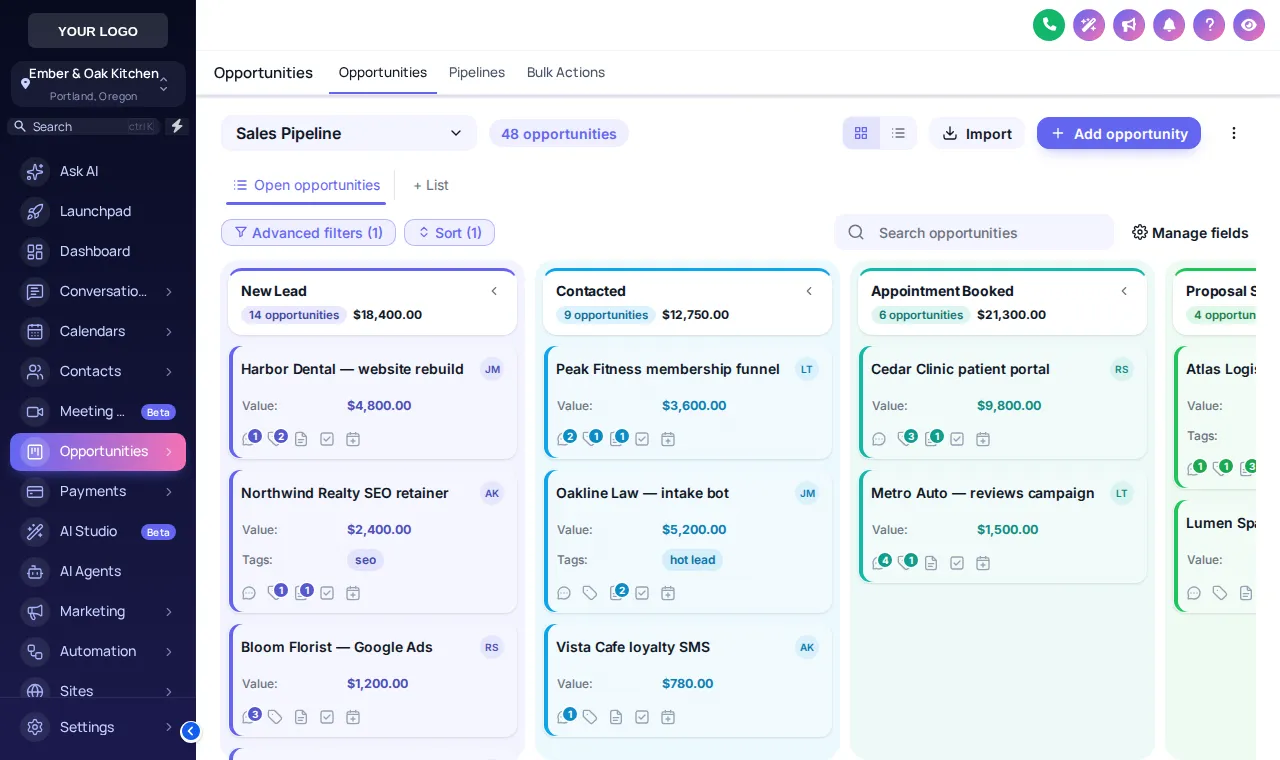
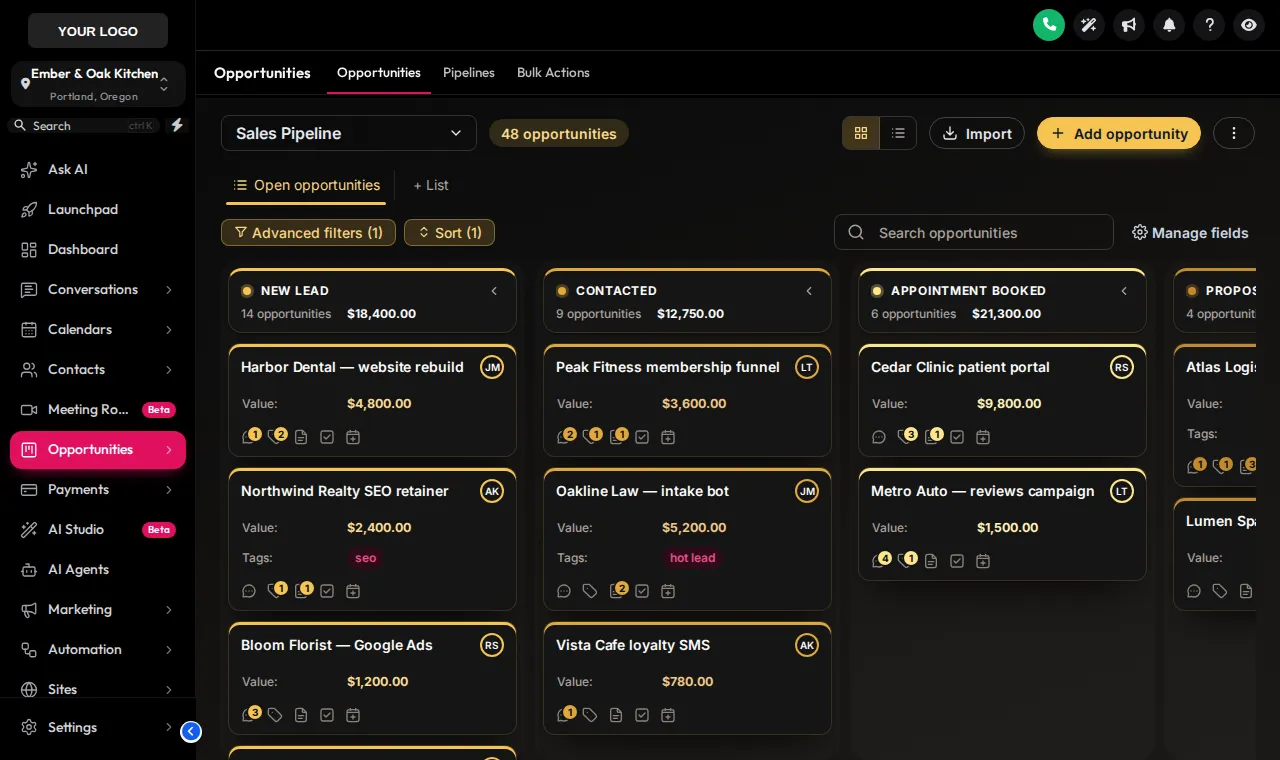
GoHighLevel pipeline board design turns the opportunities view into something the events coordinator can read at a glance. Choose one of 12 styles: stage colours by column, styled deal cards and toolbar, for every pipeline you run. Private dining enquiries, catering quotes and buyouts stay in the same stages; they just stop looking like a spreadsheet.
Enquiry
Menu sent
Deposit paid
Confirmed
Fire the board
Try 12 GHL opportunities board styles
Each chip is a real board template applied to a copy of the GoHighLevel opportunities page. Colour Ribbon is tonight’s pick; hover a chip for a one-line description.
Warming up the live preview
Colour RibbonA copy of the GoHighLevel opportunities board, restyled by the real engine. Stage colours follow each column’s position, so your own pipelines pick them up whatever the stages are called.
How the colours work
GHL stage colours by position, not by name
Stage colours are tied to column order. Column one takes the first colour, column two the second, and so on. That is why one design works across an events pipeline, a catering pipeline and a guest-feedback pipeline without you naming anything.
- Clean Lightlight
- Frosted Glasslight
- Midnight Neondark
- Neo Brutallight
- Candy Pastellight
- Gradient Headerslight
- Compact Prolight
- Colour Ribbonlight
- Obsidian Golddark
- Ocean Prolight
- Emerald Calmlight
- Brand Matchlight
Event booking pipeline
Where a styled board helps a restaurant
Grey board
- Every stage the same colour
- Deposit-paid parties lost among enquiries
- Dense cards on a laptop in the office
Styled board
- Stages you can tell apart from across the room
- Confirmed buyouts easy to spot
- Cards with breathing room, or compact when you need more
- Private dining and buyouts
Enquiry, menu sent, deposit paid, confirmed: each its own colour on the board.
- Catering orders
A compact design fits a week of drop-offs on one laptop screen.
- Agency sales to restaurants
Your own new-business pipeline in your brand, ready for a screen-share with a prospect.
- Guest recovery
A feedback pipeline where unhappy-guest follow-ups stand out in a warning colour.
Setting it up
How to restyle the opportunities board
Pick a board design
Choose one of the 12 opportunities-board designs and preview it on a sample pipeline.
Let stage colours follow position
Colours are assigned by column order, so every pipeline you have, whatever its stage names, picks them up.
Style the deal cards
Cards, toolbar and list view are styled by the design; the fields on each card stay as GoHighLevel shows them.
Save
The board updates for every user on their next page load. Your stages, deals and automations are not touched.
Questions from the rail
GoHighLevel pipeline board FAQs
Can I change how the GHL pipeline looks?
Yes. The customizer restyles the opportunities board: column headers, stage colours, deal cards, the toolbar and the list view. There are 12 designs, 2 of them dark.
Do pipeline styles change my stages or deals?
No. Stages, deal values, owners, tags and every workflow tied to the pipeline stay exactly as they are. Only the drawing changes.
Do the stage colours follow my own stage names?
They follow column position, not names. The first column always gets the first colour and so on, so an events pipeline, a catering pipeline and a sales pipeline all colour themselves correctly.
Which design reads best on a busy screen?
Colour Ribbon and Gradient Headers make each stage obvious at a distance. Compact Pro fits more cards on a laptop. Obsidian Gold and Midnight Neon suit dark themes.
Does it work in list view too?
Yes. The design covers the list view as well as the board, so switching views keeps the same look.
Can I use it with a restaurant snapshot pipeline?
Yes. Any pipeline already in the account, including those installed by a snapshot, is restyled without changes to its stages.
Can I try the designs first?
Yes. The preview above applies each real board template to a copy of the GoHighLevel opportunities page, with a sample pipeline.
Which package includes the pipeline designer?
It starts on Main Course ($387 once) and is included on every larger menu.
Pairs well with
More courses
Quick tags from the contact actions bar can start the workflow that moves a party along this board.
Ready when you are
Run events off a board you can read
Pipeline styles, dashboard designs, mega menus and contact actions come on Main Course, paid once.
Paid once by card through Stripe · login by email within minutes · no monthly fee