It is a slow Tuesday and a regular you half-recognize is standing at your host stand, phone out, grinning. “I found you on Google and did a pickup order on the app,” she says. You thank her, then do the math on the drive home. That $64 order she placed through DoorDash cost you close to twenty dollars in commission. You just paid a marketplace to reach a guest standing inside your restaurant.
Here is the part most owners never notice: she did not go looking for DoorDash. She searched your restaurant’s name, tapped the big “Order Online” button Google puts at the top of your listing, and Google handed her to a third-party app. The button looked like yours. The order was not.
Table of Contents
- The 30-second answer
- Why Google hands your diners to DoorDash
- What that button actually costs you
- The 6-stage plan to take your orders back
- Steal this: the exact messages and posts
- Run it for your size: solo, busy independent, small group
- Objections, answered straight
- Frequently asked questions
The 30-Second Answer
Google puts an “Order Online” and sometimes a “Reserve a Table” button at the top of your Business Profile. If you never set those links yourself, Google fills them with whatever third-party providers have your menu, usually DoorDash, Grubhub, Uber Eats, or Slice. So a guest who searched your name gets routed into an app that takes a cut of the sale.
You fix it in your own Google Business Profile dashboard. Claim the profile, open the Food ordering section, hide the providers you do not want, add your own ordering and booking link, and mark it as preferred so Google shows yours first. Then make the direct path worth taking and capture the guest’s number so you can bring them back for free.
Why Google Hands Your Diners to DoorDash
Your Google Business Profile is the most important piece of real estate you own online, and most owners never log into it. It is the box on the right of search results and the pin on Maps, with a row of action buttons: Call, Directions, Website, and the two that cost you money, Order Online and Reserve a Table.
Those buttons are populated by Google’s partner program. Delivery apps and reservation platforms feed Google your menu, and in return Google shows their link. If you never set a preferred link of your own, the button defaults to whoever is in that feed, usually a delivery app you signed up with years ago and forgot. Google is not being sneaky; the problem is that the default serves the apps, not you, and almost no independent has opened the settings that control it.
It got worse for a stretch. Google used to run its own checkout, Order with Google, but in mid-2024 it wound that down and the button became a pure redirect: tap it and you are bounced to a third-party site to finish the order (Search Engine Roundtable, 2024).
The timing is why this post exists. In late October 2026, a Google product lead announced that restaurants can now manage third-party ordering providers individually and opt specific ones out from the dashboard, naming Uber Eats, DoorDash, Instacart, and Grubhub (Search Engine Roundtable, 2026). For years the only way to remove a delivery link was to file a request with the app and wait. Now the control is yours.
What That Button Actually Costs You
Start with the headline number. DoorDash publishes three marketplace delivery tiers: Basic at 15%, Plus at 25%, and Premier at 30%, with 6% on pickup across all three (DoorDash, 2026). Uber Eats and Grubhub land in the same range, and once you add processing and promotions the all-in cut routinely clears a quarter of the order, as our full delivery-cost teardown shows.
Now picture a guest who was going to order from you anyway. She knows your name and typed it into Google, so she is a direct customer worth the full check. The button converts her into a marketplace order and quietly deletes 15% to 30% of it. You paid a finder’s fee to find someone who already found you.
Marketplace commission kept by the app on a delivery order, by DoorDash plan tier, versus a direct order through your own link. Source: DoorDash merchant pricing, 2026. Processing and promotions are extra.
The cash is only half of it. When the order runs through an app, the guest’s name, phone number, and order history belong to the app, not to you. You cannot text her next week about the slow-Tuesday special or ask her for a Google review while the meal is warm. You rent that relationship back every time she orders. We make the full case in why you should own your guest list instead of renting it, and it is the real reason this fix is worth an afternoon.
The demand is already there: 58% of diners prefer to order delivery from a restaurant’s own app or website, per NCR Voyix’s 2025 survey above. Diners are loyal to the fastest button in front of them, not to DoorDash. Make yours the fastest, and most come with you.
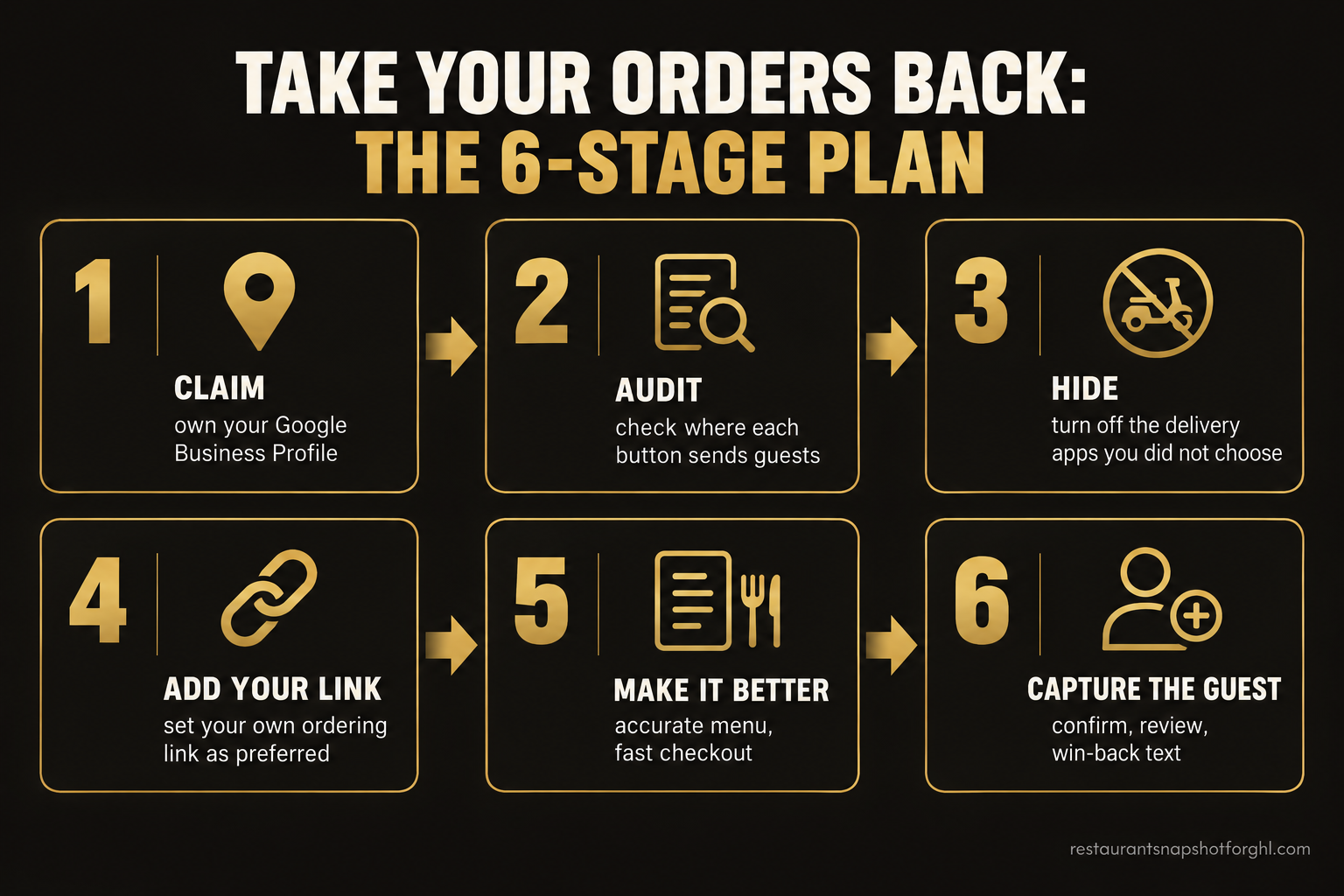
The 6-Stage Plan to Take Your Orders Back
A one-afternoon project with a long payoff. Work the stages in order. Each has a “how it breaks” note, because the failure modes are where most owners quietly give up.
Stage 1: Claim and verify your profile
You cannot change a single button until the profile is yours. Search your name on Google, find your listing, tap “Own this business?” and verify by the method Google offers, usually a video call or a postcard.
How it breaks: the profile is already claimed, often by a former manager or an agency you fired. Use Google’s “Request access” flow and wait for the owner to respond. Never create a duplicate listing instead, because duplicates split your reviews and tank the local ranking we cover in winning the Google Map Pack.
Stage 2: Audit what is on your listing right now
Open your profile on your phone the way a guest sees it. Tap Order Online and Reserve a Table, and write down exactly where each sends you. Most owners are surprised: a delivery app they forgot, or a menu three price updates out of date.
How it breaks: you check on desktop, see your website, and assume it is fine, but mobile shows a different provider. Always audit on a phone, where the orders actually happen.
Stage 3: Hide the providers you did not choose
In your Business Profile, open Food ordering. If ordering was off, turn on “Accept orders on your profile” first. Then select each provider and turn its “Show for pickup” and “Show for delivery” toggles off to hide it completely. Save, confirm, and it usually appears on Search and Maps within a few hours (Google Business Profile Help, 2026).
How it breaks: you expect it to vanish instantly and panic when it does not. Give it a few hours, then recheck on mobile. Hiding DoorDash from your Google button does not close your DoorDash account; it only changes what Google shows, so you can keep apps live for discovery and just stop feeding them guests who already know the name.
Stage 4: Add your own link and set it as preferred
In the same list, select “Add a link” and enter your own ordering page, and do the same for Reserve a Table with your booking link. Then select your link, choose “Set as preferred,” and turn on “Preferred for pickup” and “Preferred for delivery” so Google surfaces yours first (Google Business Profile Help, 2026).
How it breaks: you do not have a direct ordering link to add, the honest gap for a lot of independents. Most POS systems include an online ordering page. For reservations and the wider guest relationship, that booking link, the reminder, and the review ask are what our reservation automation handles. Add the link first; make it good next.
Stage 5: Make the direct path better than the app
A reclaimed button only helps if the page behind it does not make the guest wish they had used the app. Diners stay on apps for order tracking and coupons, not out of love. Match the table stakes: an accurate menu with real photos, a checkout that works in three taps, honest prep times, and a small reason to come direct.
How it breaks: the link works but the menu is stale or checkout is clunky, so the guest bounces back to the app for good. Test your own direct order weekly like a secret shopper.
Stage 6: Capture the guest so you never pay to reach them again
The stage the apps hope you skip. When a guest orders or books direct, you finally have their name and cell. Send a clean confirmation, ask for a Google review, and a week later invite them back on a slow night. That loop turns a one-time order into a regular, the argument in how to turn delivery customers into regulars.
How it breaks: you collect numbers and never message them, or you blast everyone daily until they opt out. The fix is a simple, consent-based sequence that runs on its own, given word for word below.
Steal This: The Exact Messages and Posts
The button is settings work; keeping the guest is copy. Here is the language, ready to adapt. Keep every text consent-based with a STOP line, per our restaurant SMS compliance guide.
The direct-order confirmation. Sent the moment a direct order is placed.
Thanks for ordering direct from Portside Kitchen, Dana. Pickup is on for 7:15pm. Order direct any time at portsidekitchen.com and skip the app fees too. Reply STOP to opt out.
The review ask. Sent about two hours after pickup, while it is fresh.
Hope dinner was great, Dana. A 10-second Google review helps a small local spot more than you know: [review link]. Thank you. Reply STOP to opt out.
The negative-feedback catch. If your review flow lets guests rate privately first, route anything under four stars to you instead of to Google, so you can fix it before it goes public. We walk through this in restaurant reputation management.
So sorry it missed tonight, Dana. I am the owner and I want to make it right. Can you tell me what happened? I read every one of these.
The win-back. Sent 10 to 14 days after a first direct order, aimed at a slow night.
Dana, it is Marisol at Portside. Tuesdays are our quiet night and our best cooking. Come in this week and the kitchen sends a dessert on us. Book: [link]. Reply STOP to opt out.
One rule before you send any of these: a number scraped off a delivery order is not consent. Collect the opt-in at the direct order or booking, log the time and wording, and honor STOP instantly.
Run It for Your Size: Solo, Busy Independent, Small Group
The six stages are the same everywhere. The right amount of effort is not.
The solo operator, one room, no marketing person
You are owner, host, and marketer at 4pm, so keep it simple. Do Stages 1 through 4 in one sitting this week, and do Stage 6 by hand: a printed sign at the register and a tablet sign-up for specials texts. A hundred opted-in locals you can text on a dead Tuesday beats a thousand anonymous app orders. The usual snag is a profile claimed by someone unreachable, so start the “Request access” clock today and do the other stages while you wait.
The busy independent, strong weekends, dead weeknights
You have the volume to make this pay fast and a person or two who can own it. Do all six stages and put real effort into Stage 5, because enough direct traffic means a clunky checkout costs you noticeably. This is where automation earns its keep: a guest orders direct, a confirmation and review ask fire on their own, and a win-back goes out before the next slow night with no one remembering. The common failure is turning off the apps, forgetting Stage 6, and deciding a month later that “direct ordering does not work” when you never captured a single guest. Capture is the point. The button is just the on-ramp.
The small group, two to five locations
Consistency is your enemy now. Each location has its own profile, and it is common to find one with the right link, one with a stale DoorDash link, and one never claimed at all. Audit every profile the same week, standardize the direct link, and use one shared guest database so a regular at your east-side room is recognized at the west-side room. A guest texted by two locations about the same special opts out of both, so coordinate centrally and check every profile monthly so a manager does not quietly re-enable a delivery app.
Objections, Answered Straight
“If I turn off DoorDash, won’t I lose all those orders?” You are not closing your DoorDash account, just changing which button Google shows to people who already searched for you by name. Those are your warmest customers, and 58% of them would rather order direct anyway (NCR Voyix, 2025). Want the apps for discovery? Keep the account active and just stop feeding them guests you already earned.
“I don’t have a direct ordering link. Isn’t this pointless?” No. Reclaim the Reserve a Table button with your booking link, and set up guest capture so you own the relationship. Adding direct ordering is easier than it sounds, since most POS systems include an online ordering page. A decent direct link beats handing away a third of the check.
“I’m not technical. This sounds like a project.” Stages 1 through 4 are settings toggles in one dashboard, not code. If you can update your hours on Google, you can do this. The part that genuinely takes a system, running the follow-up texts without it becoming a second job, is the part we automate.
“Won’t guests find the texts annoying?” Only if you spam them. A confirmation, one well-timed review ask, and an occasional slow-night invite is a service. The annoying part is frequency and irrelevance. Keep it to messages a guest is glad to get, honor STOP instantly, and your opt-out rate stays tiny. And Google keeps expanding ordering, lately inside Maps with POS partners, which is one more reason to own your menu, direct link, and guest list now rather than let the default decide.
Frequently Asked Questions
Why does my Google listing show DoorDash when I never set that up?
The 'Order Online' button defaults to Google's partner feed when you have not set a preferred link of your own, so delivery apps that have your menu get placed there automatically. Since late October 2026 you can hide individual providers from your Business Profile dashboard, under Food ordering.
How do I remove the DoorDash or Grubhub link from my Google profile?
Open your Business Profile, go to Food ordering, select the provider, and turn off both 'Show for pickup' and 'Show for delivery,' then Save and Confirm. The change usually appears within a few hours. If a provider will not drop, use Google's support flow under 'Online food ordering' to request removal.
Does hiding a provider on Google close my delivery app account?
No. It only changes what Google shows on your listing. Your DoorDash, Uber Eats, or Grubhub account stays active and you still appear inside those apps. You are simply deciding not to route guests who found you on Google into an app that charges you a commission.
What if I do not have my own online ordering page?
Add what you can now. Most POS systems include a direct ordering page, and dedicated direct-ordering tools exist for this. You can also reclaim the 'Reserve a Table' button with your own booking link even if you do not sell delivery. The goal is to own at least one direct action and capture the guest from there.
Can I legally text guests who order direct?
Only with consent. A number from an order is not permission to market to them. Collect a clear opt-in at the point of the direct order or booking, record the time and wording, include a STOP line in every message, and honor opt-outs immediately. Our TCPA compliance guide covers the specifics for restaurant SMS.
The Bottom Line
The guest at your host stand on that slow Tuesday was never DoorDash’s customer. She was yours. Google just showed her the app’s button instead of your door, and that is a default you can change this week, in your own dashboard, for free. Claim the profile, audit the buttons, hide the providers you did not choose, add your own link and make it preferred, then capture the guest. The settings take an afternoon; owning the guest pays for years. With $1.55 trillion in U.S. restaurant sales projected for 2026 (National Restaurant Association, 2026), the operators who keep the most of each check will be the ones who stopped paying to find guests who already found them.